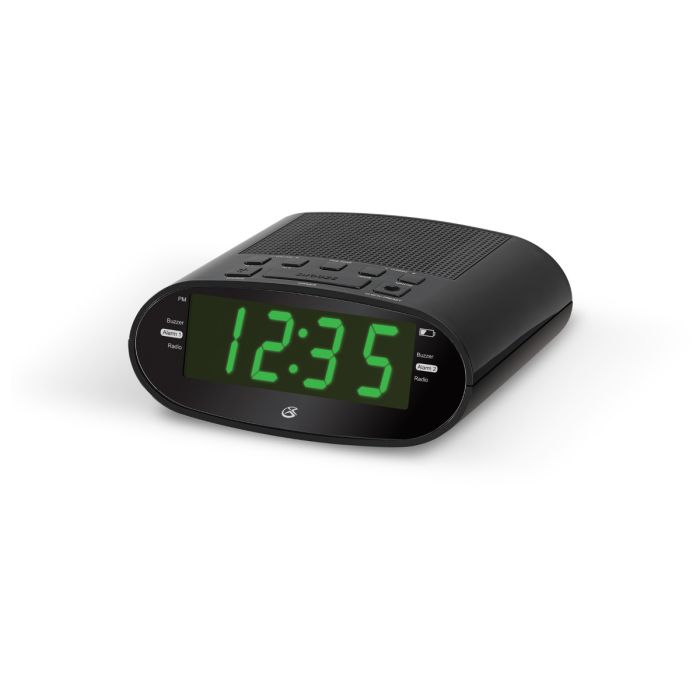
Exactly What You Need and Want - This clock radio has a dual alarm function to make sure you get up on time. Listen to your favorite radio stations anytime. Form and Function - The sleek styling looks great anywhere. Intuitive controls allow for easy operation and a large display is
easy to read
Daylight savings time control
Digital AM/FM radio (PLL)
Dual alarm
1.2" green LED display
Station memory presets (10 FM, 10 AM)
Last user's setting memory
USB port for mobile phone charging
PM indicator
Low battery indicator
Digital volume control
Digital clock
Wake to radio or buzzer
Snooze and sleep function
Gradual wake to radio
Dimmer control
Time zone control
Built-in speaker
Built-in AM antenna
Built-in FM wire antenna
AC power input: requires an AC/DC power adapter (included)
Battery backup for clock: requires a CR2032 battery (pre-installed)
Dimensions: 6.06 x 5.12 x 2.52
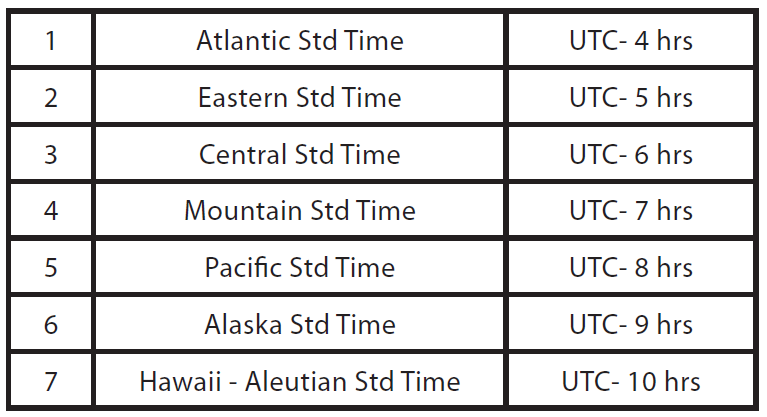
The clock has an auto time set feature. Out of the box it is initially set to EST (#2) but the time zone feature can be adjusted by pressing the Time Zone button. Each time zone has a corresponding number please see the grid below.
How do I set the clock time
Press and hold the Clock button until the display begins flashing.
Press the Hour and Minute buttons to adjust the time. The PM indicator will light when the hour is set in the PM.
Press the Clock button again set the day of the week. Press the Hour and Minute button to adjust the day from 1 to 7. Example: 1 - Monday, 2 - Tuesday, etc.
Press the Clock button again to finish, or wait for the display to stop flashing.